01 / School operations · Parent engagement
Eve Compass
One app for the whole school day at Chintamani International School: attendance, homework, fees, notices and meetings for parents, teachers and office staff, with an AI assistant built in.
Visit the live websites
The problem
At Chintamani, the school day ran on paper and phone calls. Attendance lived in registers, so a family often learned about an absence only later. Notices and homework went out through WhatsApp groups and printed circulars, where they were easy to miss or lose under other messages. Fees were recorded in registers and spreadsheets, and the office followed up on payments by phone.
A parent who wanted an update had two choices: ring the office or a teacher, or come to the school in person. Those visits were rarely planned, so they often arrived in the middle of a lesson, pulling a teacher out of class and interrupting the whole room.
Conversations with families and staff showed what this cost each side. Parents felt out of the loop on attendance, homework and progress unless they went looking for it. Teachers were spending too much of their day on registers, messages and paperwork, and too little of it teaching.
That set the brief: give every role one place for the information it needs, send updates to parents without them having to ask, take routine admin off teachers, and give meetings a booked slot instead of an unplanned visit.
What I built
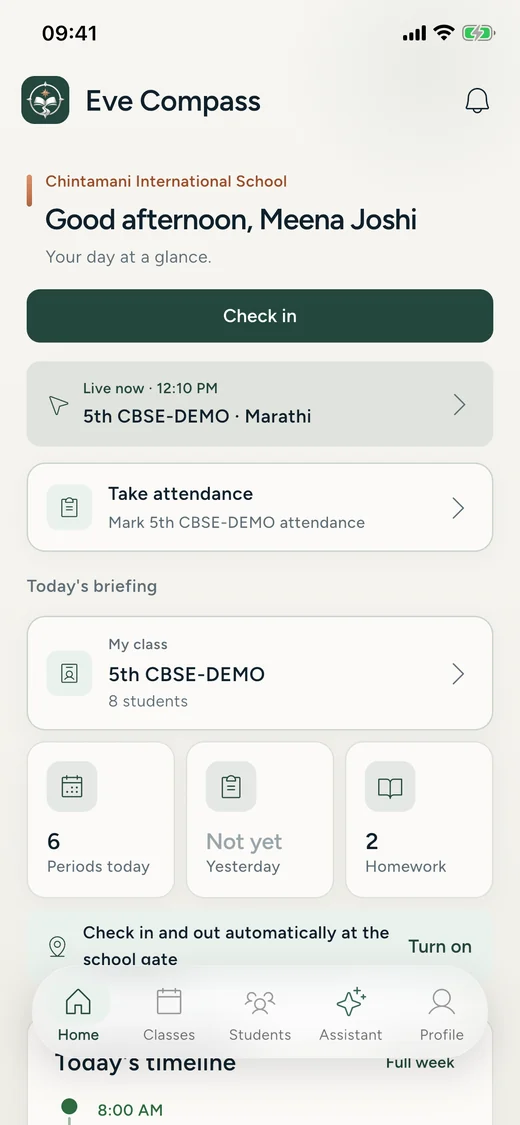
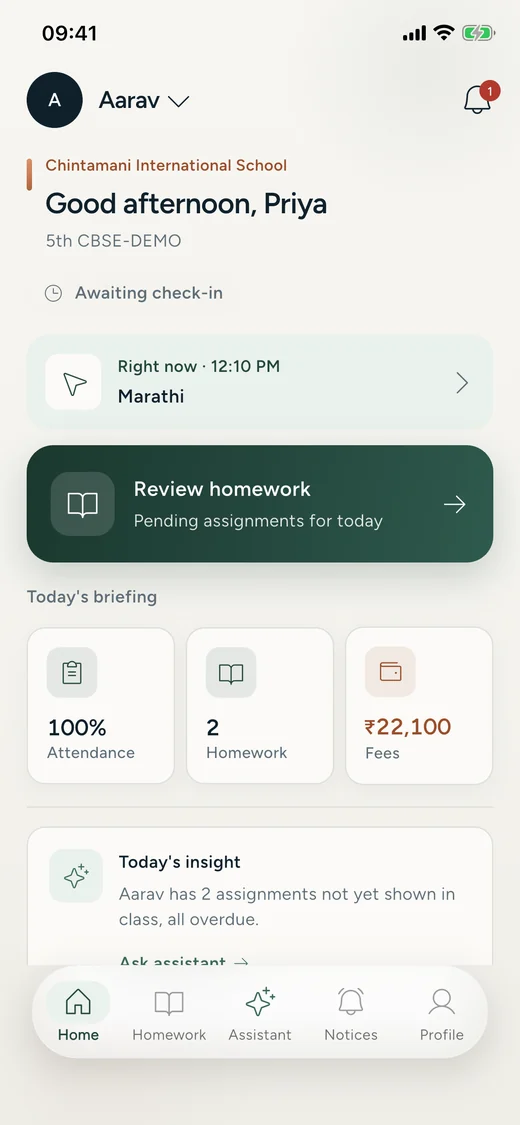
I designed and built two things. The public website is where families considering the school first meet it, with a clear route into admissions. Eve Compass is the working system behind each day: teachers mark attendance and set homework from their phones, parents hear about both as soon as they are recorded, the office keeps fees and notices in one dashboard, and parent–teacher meetings are booked into slots that teachers publish. Parents, teachers and office staff each get their own view of the same records.
- Public school website
- Role-based management app
- Attendance, notifications & booking
- AI-assisted attendance & homework posting
- Class-level explanations & learning hints
A view for each role
Teachers, parents and operations staff use separate experiences within one platform. Access is organised around each role's responsibilities.
Teacher check-in on campus
I implemented teacher attendance with QR codes that refresh every 15 seconds and a 100-metre campus-radius restriction.
Keeping parents informed
As soon as a teacher submits attendance, parents get a notification, so nobody has to call the school to find out whether their child arrived.
Appointments with a time and place
Teachers publish when they are free and parents reserve one of those slots, so a conversation happens at an agreed time rather than interrupting a lesson.
How it's built
The teacher and parent apps are written in Flutter for Android and iOS. A TypeScript, Node.js and Express API with Prisma and PostgreSQL serves them and a React admin dashboard. Firebase Cloud Messaging delivers notifications, and the AI assistant runs on Google's Gemini API. The public school website is built with React and Vite and served from Cloudflare.
The rest of the school day
The same system covers assessments, behaviour, leave, timetables, calendars and parent–teacher appointments, alongside fees, notices and homework.
How the AI assistant works
An assistant for everyday teaching tasks
The AI assistant helps teachers take attendance and post homework within Eve Compass, bringing those tasks into the same conversation as their teaching questions.
Explanations that match the class
Teachers can ask syllabus-related questions and specify the class they are teaching. A request to explain photosynthesis to Class 2 receives different content from the same request for Class 10, with the explanation adapted to the class level.
Hints after an attempt
For student homework requests, the assistant is designed to encourage learning rather than supply completed answers. It asks students to try the problem themselves first. If they are stuck, it asks them to show their attempt, then offers a hint to help them continue.
Results
The website and Eve Compass are both live, and Eve Compass is the first product Evaradh has shipped. Registers, circulars and update calls now have a place in the app.
From 20 July to 29 October 2026, teachers recorded 7,162 attendance marks across 59 school days, and the app sent 18,038 notifications to 359 parent accounts covering 290 students in 20 classes.
Privacy and safety
Only signed-in teachers, parents and office staff can use the assistant, and it works inside each person's role: a request for information that role cannot see is refused. Parents only ever get answers about their own children, and the server checks that on every request rather than trusting the app.
The assistant drafts; people decide. When it prepares attendance, homework or a notice, the teacher sees the draft and nothing is saved or sent until they review it and tap Save or Post. A draft with a name it could not match cannot be saved at all.
Every action taken through the assistant is logged with who did it, their role and the outcome, and each school has a daily allowance of AI calls. To write a reply, the question and the records needed to answer it go to Google Gemini; report-card drafts identify students by number, not by name. Parents can delete their own account from the app, as the privacy policy describes.
Media
Next project / 02